Grom: A Futuristic Font with Power and Precision
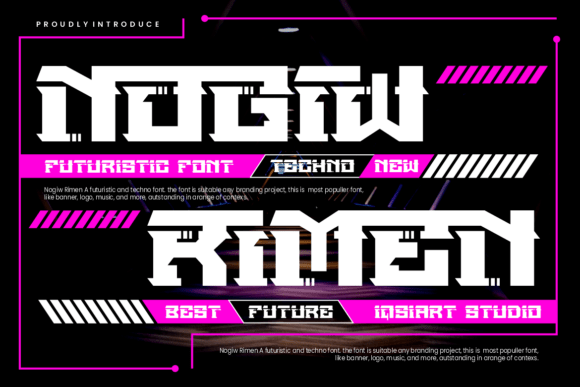
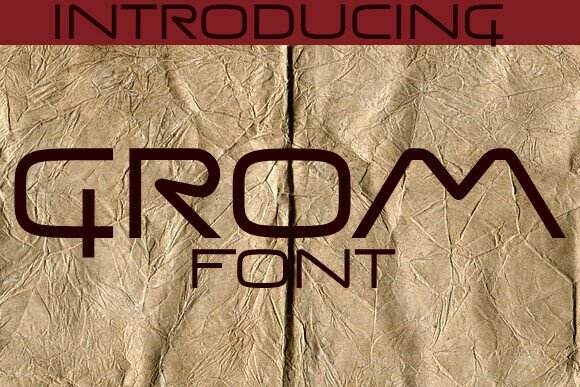
When it comes to making a visual impact, the choice of typography can be just as important as the message itself. Grom stands out as a bold, futuristic display font that brings a sharp, high-tech edge to any project. With its angular lines, distinctive letterforms, and a strong sci-fi influence, Grom is more than just a typeface — it's a statement. Whether you're designing a game title, a tech brand identity, or a movie poster, Grom delivers a modern punch that commands attention.
Why Grom Captures Attention
Designers and creators are drawn to Grom for its unique aesthetic that blends functionality with futuristic flair. Unlike more generic display fonts, Grom is crafted for high-impact applications where legibility meets visual drama. Its geometric structure and sharp edges suggest innovation and strength, making it ideal for branding in tech, gaming, and digital media spaces.
However, like any specialized tool, using Grom effectively requires understanding its strengths — and its limitations. Many users jump into using Grom without fully considering how it fits into their broader design goals, which can lead to underwhelming results.
1. Misjudging the Context
One of the most frequent missteps is using Grom in contexts where its bold personality clashes rather than complements. For example, applying Grom to a minimalist website or a formal business document can feel jarring and out of place.
Result: The design appears mismatched, reducing readability and undermining the intended tone.
Better approach: Use Grom for headlines, logos, or promotional materials where a futuristic or high-tech feel is desired. Pair it with simpler, more neutral fonts for body text to maintain balance.
2. Ignoring Legibility at Smaller Sizes
While Grom shines in large, attention-grabbing headlines, its sharp angles and tight spacing can make it difficult to read at smaller sizes.
Result: Important information becomes hard to decipher, especially on mobile screens or printed materials.
Better approach: Reserve Grom for titles and headings where it can be displayed prominently. For body text or interface elements, opt for a more readable sans-serif font.
3. Overlooking Licensing Details
Another common oversight is not checking the licensing terms before downloading or purchasing Grom. Some versions may be free for personal use but require a commercial license for professional projects.
Result: Legal complications or unexpected costs down the line.
Better approach: Always verify the license type before use. If you're working on a commercial project, invest in a proper license to avoid future issues.
4. Assuming It Works for Every Project
Grom's futuristic style makes it a go-to for certain industries, but it's not a one-size-fits-all solution. Using it outside of its intended design scope can make a project look outdated or forced.
Result: The design loses its impact and may even alienate the target audience.
Better approach: Consider the tone and theme of your project. If your brand or message leans toward tradition, elegance, or simplicity, explore other font options that better align with those values.
How to Use Grom Effectively
Understanding how to integrate Grom successfully into your design workflow can elevate your project from good to great. Here are some practical tips to help you make the most of this striking typeface:
- Pair it wisely: Combine Grom with clean, minimalist fonts to create contrast and balance. Sans-serif fonts like Helvetica or Futura often complement Grom’s structured geometry.
- Use it for impact: Save Grom for key headlines, logos, or call-to-action buttons where visual strength is needed. It works exceptionally well in digital environments like websites, app interfaces, and video game UIs.
- Test in context: Before finalizing your design, test how Grom looks across different devices and screen sizes. Ensure it remains legible and visually appealing in all intended applications.
- Explore variations: If available, experiment with different weights or styles of Grom to see which one best fits your needs. Some fonts come with alternate characters or ligatures that add extra flair.
What to Check Before Downloading or Buying Grom
Before you commit to using Grom in your project, take a few moments to evaluate the following:
- Font quality: Look for clean outlines, consistent spacing, and well-designed characters. Poorly constructed fonts can cause rendering issues or visual inconsistencies.
- Licensing terms: Confirm whether the font is free for personal use, commercial use, or if a premium license is required. Always read the fine print.
- Character set: Make sure the version you're considering includes all the characters you need, especially if your project uses special symbols or non-English characters.
- Support and updates: Check if the designer or foundry offers support or updates. A well-maintained font is more likely to remain compatible and relevant over time.
Final Thoughts
Grom is a powerful font that brings a futuristic, high-tech edge to the right design environment. Its bold structure and unique character make it an excellent choice for gaming, tech branding, and digital artwork. But like any design element, its effectiveness depends on thoughtful application.
By avoiding common mistakes — from misjudging context to overlooking licensing — you can ensure that Grom enhances your project rather than hinders it. Always test, evaluate, and pair it with complementary elements to achieve a balanced and professional result.
If you're looking for a font that delivers modernity and impact, Grom could be exactly what you need — just make sure you're using it the right way.