Nice Treat: Sweeten Your Designs with a Playful, Versatile Display Font
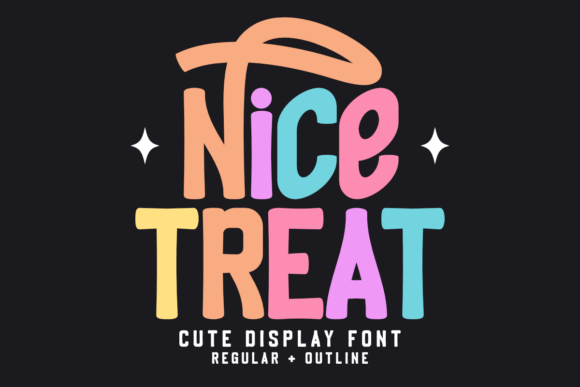
If you're looking to add a dash of charm and a sprinkle of joy to your creative projects, Nice Treat might just be the perfect typeface for you. This irresistibly cute and playful display font brings the whimsy of a candy shop straight to your designs. With its rounded, friendly letters and vibrant personality, Nice Treat comes in both regular and outline styles, offering flexibility for a wide range of creative uses.
Whether you're an Etsy seller crafting party invitations, a Cricut user designing custom apparel, or a print-on-demand entrepreneur creating cheerful products, Nice Treat can elevate your visuals with its inviting appeal. But like any design tool, it's not just about how it looks — it's about how you use it.
Common Mistakes When Choosing and Using Nice Treat
While Nice Treat is a versatile and charming font, it's easy to fall into a few common traps when selecting or applying it. These missteps can impact the clarity, professionalism, and overall effectiveness of your design — especially if you're not paying attention to context and application.
Mistake 1: Using Nice Treat in Inappropriate Contexts
One of the most frequent errors is using Nice Treat in projects that require a more formal or professional tone. While its playful nature is a strength, it can become a liability in settings like business reports, academic materials, or branding for serious industries.
Better Approach: Reserve Nice Treat for lighthearted, fun, or child-oriented designs — such as birthday cards, nursery art, or whimsical digital prints. If you're unsure, consider pairing it with a more neutral sans-serif font for contrast and balance.
Mistake 2: Overusing the Outline Style
The outline version of Nice Treat is a great option for adding visual interest and layering in designs. However, some users overuse it, especially in small sizes or complex layouts, which can lead to readability issues.
Better Approach: Use the outline style strategically — for titles or background elements where legibility isn't critical. For body text or small captions, stick with the regular style to maintain clarity.
Mistake 3: Ignoring Licensing Restrictions
Many designers download Nice Treat without fully understanding the licensing terms. Some versions are limited to personal use, and using them for commercial projects without a proper license can lead to legal complications.
Better Approach: Always verify the license type before using Nice Treat in any project that generates income — especially for Etsy shops, print-on-demand services, or client work. Purchase a commercial license if needed, and keep a copy of your proof of purchase for your records.
Mistake 4: Assuming It Works for All Sizes
Nice Treat’s rounded, whimsical design is best suited for medium to large text sizes. At smaller sizes, the soft edges and curves can blur together, making the text hard to read.
Better Approach: Test Nice Treat at the intended size before finalizing your layout. If it's going to be used on a small label, mobile screen, or printed material that won’t be viewed up close, consider a simpler font for better legibility.
How to Choose the Right Version for Your Project
Nice Treat offers two main styles: regular and outline. Knowing when to use each can make a big difference in the outcome of your design.
- Regular Style: Best for primary text, headlines, and situations where clarity is key.
- Outline Style: Works well for overlaying on images, creating layered text effects, or adding a decorative touch where legibility isn't the priority.
Some users also combine both styles in a single design — for example, placing outlined text behind a solid version to create a shadow or highlight effect. This can add depth and dimension without sacrificing readability.
Practical Tips for Using Nice Treat Effectively
Here are some hands-on suggestions to help you get the most out of Nice Treat without compromising quality or usability:
- Pair it with a clean sans-serif or serif font to balance the playful look and maintain visual hierarchy.
- Use it in color — Nice Treat shines when applied in vibrant hues like pink, mint green, or sky blue, enhancing its candy-like charm.
- Avoid using it in all caps unless necessary. The rounded shapes can blur together and reduce readability.
- Test it in different formats — especially if your design will be used both digitally and in print. What looks great on screen may not translate well on fabric or vinyl.
What to Check Before Downloading or Buying Nice Treat
Before you commit to using Nice Treat, take a few moments to verify the following details:
- Font Format: Make sure it includes the file types you need (e.g., .ttf, .otf, .woff) for compatibility with your software or platform.
- Language Support: Check if it includes special characters or accents you may need, especially for non-English text.
- Commercial Use Rights: Confirm whether the version you’re downloading allows for commercial use, especially if you're a small business owner or creator selling digital or physical goods.
- Customer Support: Look for fonts from reputable designers or platforms that offer support in case you run into technical issues.
Final Thoughts: Make the Most of Nice Treat Without Overdoing It
Nice Treat is a fantastic choice for adding a sweet, friendly tone to your creative projects. Its versatility and charm make it a favorite among designers, hobbyists, and entrepreneurs alike. But like any design element, it works best when used thoughtfully and appropriately.
By avoiding common pitfalls — such as misjudging context, ignoring licensing terms, or underestimating readability concerns — you can ensure your designs remain both visually appealing and functionally effective. Whether you're creating a custom Cricut banner or a whimsical nursery print, let Nice Treat bring a smile to your work — and to those who see it.